 Skip to content
Quick answer: what is the BDG Game app?
The BDG Game app is the Android version of the BDG Win platform. It uses the same account, wallet and games as the website and installs from the Download APP button, not from the Google Play Store. It is optional: everything also works in a mobile browser.
Features
What can I do in the BDG Game app?
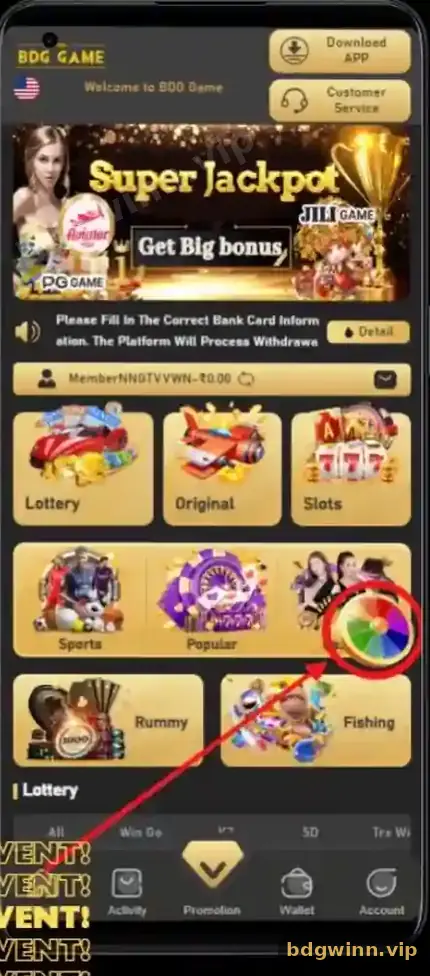
The app has five bottom tabs: Home, Activity, the centre Get ₹500 button, Promotion and Account.
| Tab | What it holds |
|---|---|
| Home | Download APP and Customer Service buttons, Super Jackpot banner, notice line, game categories and the Lottery row |
| Activity | Invitation bonus, Betting rebate, Super Jackpot, Gifts, Attendance bonus and event banners |
| Get ₹500 | First deposit reward for new members |
| Promotion | Your invite link and referral statistics |
| Account | Balance, ARWallet, Deposit, Withdraw, VIP, histories, Gifts, Language and Service center |
Some captures show a Wallet tab in the bottom bar instead; the layout changes between versions.
Decision help
Should I use the BDG app or the browser?
Use the app if you play often on Android; use the browser on iPhone, on a computer or if you do not want to install anything.
| BDG app | Browser | |
|---|---|---|
| Install needed | Yes, APK | No |
| Devices | Android | Android, iPhone, PC |
| Account and wallet | Same | Same |
| Opens with one tap | Yes | Via a bookmark or home-screen shortcut |
| Updates | Reinstall newer APK | Automatic |
Browser play is covered on BDG Game online.
Setup
How do I set up the BDG app safely?
Install from the Download APP button, log in, set your language and check your details before depositing.
- Install the APK. Follow the BDG Game download guide.
- Log in. Use your registered number and password.
- Set the language. Account → Language shows the current choice, such as English.
- Save withdrawal details. Add your bank card or UPI details correctly once.
- Turn off unknown installs. Remove the “install unknown apps” permission from your browser after installing.
Updates
How do I update the BDG app?
Download the newest APK from the Download APP button and install it over the old app.
Updating does not touch your balance, because your money and history live in your account. If the app stops opening after an update, uninstall it and install again from a fresh download. Do not hunt for an old APK on other websites; the BDG old version page explains the risk. More on the platform itself is on our BDG Win homepage.
Play Store
Is the BDG app on the Google Play Store?
No. Apps in the Play Store using the BDG name are not the platform app.
Some Play Store listings are unrelated guides; others copy the BDG design. The only install route we describe is the Download APP button inside BDG. If an app asks for SMS, contacts or accessibility permission, uninstall it.
FAQ
BDG Game app FAQ
Is the BDG app free?
Yes, the app is free to download and install.
Is the BDG Game app on Play Store?
No. Install it with the Download APP button on the BDG home screen.
Does the BDG app work on iPhone?
The APK installs on Android only. On iPhone, use BDG in Safari.
Is my account the same in the app and browser?
Yes. One account, one password and one wallet work everywhere.
What is the Get ₹500 button in the app?
It opens the first deposit reward for new members. It is not free cash without a deposit.
Why does my app look different from the screenshots?
BDG updates its layout from time to time, for example swapping a Wallet tab for Promotion.
Summary
Key takeaways
- The BDG app is Android-only and installs as an APK.
- It is not on the Play Store.
- Account, wallet and games are the same as in the browser.
- Update by installing the newest APK over the old one.
- Remove unknown-install permission after installing.
